> ## Documentation Index
> Fetch the complete documentation index at: https://docs.gourmand.dev/llms.txt
> Use this file to discover all available pages before exploring further.
# How to Configure Gobi
> Learn how to access and manage Gobi configurations through Hub or local YAML files
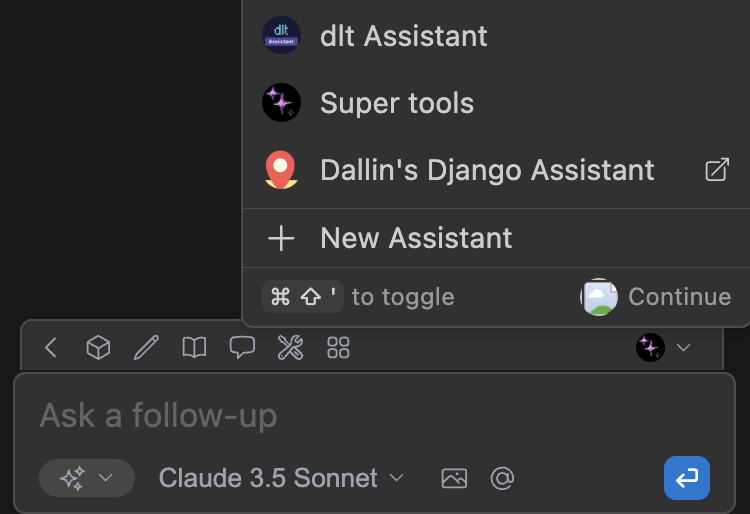
You can easily access your configuration from the Gobi Chat sidebar. Open the sidebar by pressing cmd/ctrl + L (VS Code) or cmd/ctrl + J (JetBrains) and click the Agent selector above the main chat input. Then, you can hover over an agent and click the `new window` (hub agents) or `gear` (local agents) icon.
 ## How to Manage Hub Configs
Hub Configs can be managed in [the Hub](https://hub.gourmand.dev). See [Editing a config](/hub/configs/edit-a-config)
## How to Configure Local Configs with YAML
Local user-level configuration is stored and can be edited in your home directory in `config.yaml`:
* `~/.gobi/config.yaml` (MacOS / Linux)
* `%USERPROFILE%\.gobi\config.yaml` (Windows)
To open this `config.yaml`, you need to open the configs dropdown in the top-right portion of the chat input. On that dropdown beside the "Local Config" option, select the cog icon. It will open the local `config.yaml`.
## How to Manage Hub Configs
Hub Configs can be managed in [the Hub](https://hub.gourmand.dev). See [Editing a config](/hub/configs/edit-a-config)
## How to Configure Local Configs with YAML
Local user-level configuration is stored and can be edited in your home directory in `config.yaml`:
* `~/.gobi/config.yaml` (MacOS / Linux)
* `%USERPROFILE%\.gobi\config.yaml` (Windows)
To open this `config.yaml`, you need to open the configs dropdown in the top-right portion of the chat input. On that dropdown beside the "Local Config" option, select the cog icon. It will open the local `config.yaml`.
 When editing this file, you can see the available options suggested as you type, or check the reference below. When you save a config file from the IDE, Gobi will automatically refresh to take into account your changes. A config file is automatically created the first time you use Gobi, and always automatically generated with default values if it doesn't exist.
See the full reference for `config.yaml` [here](/reference).
## Legacy Configuration Methods (Deprecated)
View the `config.json` migration guide [here](/reference/yaml-migration)
* [`config.json`](/reference) - The original configuration format which is stored in a file at the same location as `config.yaml`
* [`.gobirc.json`](#how-to-use-gobircjson-for-workspace-configuration) - Workspace-level configuration
* [`config.ts`](#how-to-use-configts-for-advanced-configuration) - Advanced configuration (probably unnecessary) - a TypeScript file in your home directory that can be used to programmatically modify (*merged*) the `config.json` schema:
* `~/.gobi/config.ts` (MacOS / Linux)
* `%USERPROFILE%\.gobi\config.ts` (Windows)
### How to Use `.gobirc.json` for Workspace Configuration
The format of `.gobirc.json` is the same as `config.json`, plus one *additional* property `mergeBehavior`, which can be set to either "merge" or "overwrite". If set to "merge" (the default), `.gobirc.json` will be applied on top of `config.json` (arrays and objects are merged). If set to "overwrite", then every top-level property of `.gobirc.json` will overwrite that property from `config.json`.
Example
```json title=".gobirc.json" theme={null}
{
"tabAutocompleteOptions": {
"disable": true
},
"mergeBehavior": "overwrite"
}
```
### How to Use `config.ts` for Advanced Configuration
`config.yaml` or `config.json` can handle the vast majority of necessary configuration, so we recommend using it whenever possible. However, if you need to programmatically extend Gobi configuration, you can use a `config.ts` file, placed at `~/.gobi/config.ts` (MacOS / Linux) or `%USERPROFILE%\.gobi\config.ts` (Windows).
`config.ts` must export a `modifyConfig` function, like:
The `slashCommands` array shown below is deprecated. For creating custom slash
commands, use [prompt files](./prompts) instead.
```ts title="config.ts" theme={null}
export function modifyConfig(config: Config): Config {
config.slashCommands?.push({
name: "commit",
description: "Write a commit message",
run: async function* (sdk) {
// The getDiff function takes a boolean parameter that indicates whether
// to include unstaged changes in the diff or not.
const diff = await sdk.ide.getDiff(false); // Pass false to exclude unstaged changes
for await (const message of sdk.llm.streamComplete(
`${diff}\n\nWrite a commit message for the above changes. Use no more than 20 tokens to give a brief description in the imperative mood (e.g. 'Add feature' not 'Added feature'):`,
new AbortController().signal,
{
maxTokens: 20,
},
)) {
yield message;
}
},
});
return config;
}
```
Built with [Mintlify](https://mintlify.com).
When editing this file, you can see the available options suggested as you type, or check the reference below. When you save a config file from the IDE, Gobi will automatically refresh to take into account your changes. A config file is automatically created the first time you use Gobi, and always automatically generated with default values if it doesn't exist.
See the full reference for `config.yaml` [here](/reference).
## Legacy Configuration Methods (Deprecated)
View the `config.json` migration guide [here](/reference/yaml-migration)
* [`config.json`](/reference) - The original configuration format which is stored in a file at the same location as `config.yaml`
* [`.gobirc.json`](#how-to-use-gobircjson-for-workspace-configuration) - Workspace-level configuration
* [`config.ts`](#how-to-use-configts-for-advanced-configuration) - Advanced configuration (probably unnecessary) - a TypeScript file in your home directory that can be used to programmatically modify (*merged*) the `config.json` schema:
* `~/.gobi/config.ts` (MacOS / Linux)
* `%USERPROFILE%\.gobi\config.ts` (Windows)
### How to Use `.gobirc.json` for Workspace Configuration
The format of `.gobirc.json` is the same as `config.json`, plus one *additional* property `mergeBehavior`, which can be set to either "merge" or "overwrite". If set to "merge" (the default), `.gobirc.json` will be applied on top of `config.json` (arrays and objects are merged). If set to "overwrite", then every top-level property of `.gobirc.json` will overwrite that property from `config.json`.
Example
```json title=".gobirc.json" theme={null}
{
"tabAutocompleteOptions": {
"disable": true
},
"mergeBehavior": "overwrite"
}
```
### How to Use `config.ts` for Advanced Configuration
`config.yaml` or `config.json` can handle the vast majority of necessary configuration, so we recommend using it whenever possible. However, if you need to programmatically extend Gobi configuration, you can use a `config.ts` file, placed at `~/.gobi/config.ts` (MacOS / Linux) or `%USERPROFILE%\.gobi\config.ts` (Windows).
`config.ts` must export a `modifyConfig` function, like:
The `slashCommands` array shown below is deprecated. For creating custom slash
commands, use [prompt files](./prompts) instead.
```ts title="config.ts" theme={null}
export function modifyConfig(config: Config): Config {
config.slashCommands?.push({
name: "commit",
description: "Write a commit message",
run: async function* (sdk) {
// The getDiff function takes a boolean parameter that indicates whether
// to include unstaged changes in the diff or not.
const diff = await sdk.ide.getDiff(false); // Pass false to exclude unstaged changes
for await (const message of sdk.llm.streamComplete(
`${diff}\n\nWrite a commit message for the above changes. Use no more than 20 tokens to give a brief description in the imperative mood (e.g. 'Add feature' not 'Added feature'):`,
new AbortController().signal,
{
maxTokens: 20,
},
)) {
yield message;
}
},
});
return config;
}
```
Built with [Mintlify](https://mintlify.com).